A browser-based mesh gradient editor built with next-gen web technologies. Design organic, flowing gradients by sculpting a bezier-patched lattice in real-time WebGL. Export to images, video, code, or as editable project files.
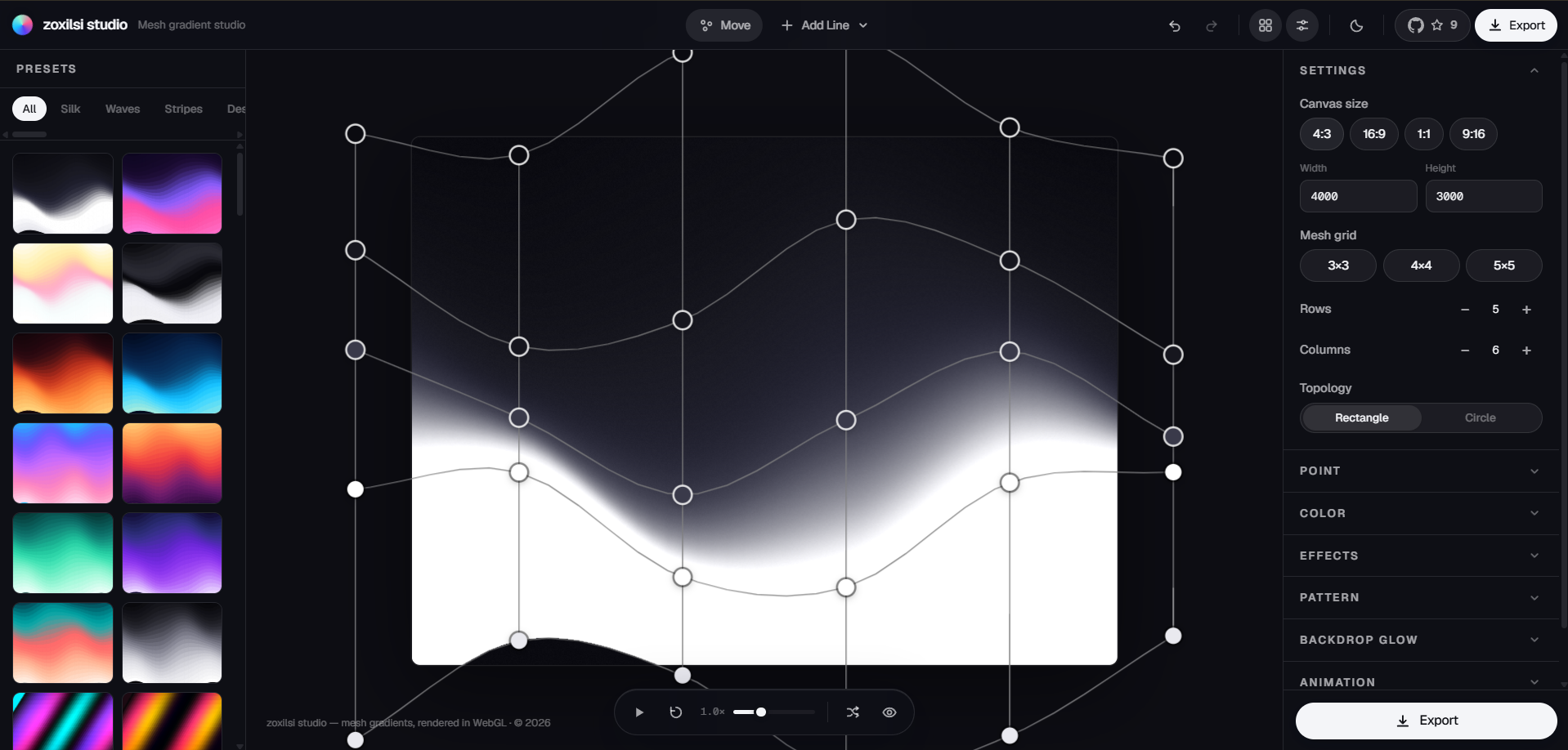
studio.zoxilsi.cc — open in Chrome, Edge, Safari, or Firefox (WebGL2 required).
Unlike static gradient generators, zoxilsi studio treats the mesh lattice as a sculptable surface. Every node carries position, color, and editable bezier tangent handles. When you drag a node, the gradient flows with the deformed geometry—it's not interpolating colors; it's interpolating warped space.
- Bicubic Hermite patches for smooth, predictable surfaces
- Live 60fps animation with per-node physics (drift, cursor attract/repel)
- True bezier editing — pull tangent handles to curve the gradient flow
- Perceptual color spaces — OKLab and LCH kill muddy browns
- 100+ presets across 21 categories (silk flows, waves, pillars, geometric patterns)
- Pattern overlays — 12 geometric types (grid, dots, waves, tiles, honeycomb, etc.)
- Backdrop glows — up to four positioned radial lights for spotlights/backdrops
- Multi-format export — PNG/JPG/WebP at any resolution, WebM video, CSS/React/SVG code
- Adjustable grid — 3×3 default, grow to 12×12 with
Add Linebutton - Topologies — Rectangle or Circle layout
- Node editing — click to select, drag to move, pull bezier handles to sculpt
- Precision tools — X/Y position inputs, color picker, tangent actions (Minimize, Maximize, Twist, Align, Space Evenly)
- Live drift — organic per-node motion with speed/intensity controls; boundary nodes stay anchored so the surface never pulls off the artboard edge
- Hue flow — node hues travel around the color wheel while playing, each at a slightly different rate, so the palette breathes through the surface
- Cursor physics — nodes attract or repel when you hover
- Playback controls — play, pause, reverse, speed scrubbing
- Still when paused — drift settles every node back to its rest position and grain/color freeze, so a paused document is exactly the designed document
- RGB, Linear RGB, OKLab, LCH — switch color spaces mid-design
- Perceptual accuracy — OKLab and LCH eliminate color mudding between complements
- Per-node picker — click a node to change its hue independently
- Effects rack — film grain, directional blur, chromatic aberration, distortion, glow, vignette, pixelate, posterize, saturation/contrast/brightness
- 11 pattern overlays — grid, dots, dot-grid, lines (H/V/diagonal), crosses, checker, waves, rings, honeycomb, tiles
- Backdrop glows — 4 positioned radial lights with per-light radius, intensity, color
A curated gallery of 100 presets across 21 categories:
| Category | Style |
|---|---|
| Silk | Compressed color bands riding slow waves (smooth, refined) |
| Waves | Full-spectrum undulating bands (dynamic, flowing) |
| Stripes | Vertical shear with specular sheen (angular, bold) |
| Pillars | Per-column hues fading to shadow at the top |
| Geometric | Glass mosaic, ink wash, candy tiles (textured overlays) |
| Glow | Spotlight backdrops with positioned radial lights |
| Cosmic | Deep space themes with noise and chromatic shifts |
| Retro | Vintage color palettes and grain textures |
| Nature | Organic gradients (sunset, forest, ocean) |
| Mono | Single-hue variations (grayscale, duotone) |
| Designer | Professional studio presets (Figma-inspired) |
| And more... | Curated themes for every design need |
Each preset thumbnail is rasterized from the actual mesh data, so what you see is what you get.
- Raster images — PNG, JPG, WebP at up to 8192×8192px (exact offscreen re-render of the GPU pipeline)
- Video up to 4K — 1080p / 1440p / 4K / Square at 30 or 60 fps, 3–20 s clips; the animation renders offscreen at full resolution (drift, hue flow and grain all move) and encodes at a bitrate matched to the pixel rate, so 4K output stays crisp
- Code — CSS gradients, Tailwind config, React component, SVG path, vanilla HTML
- Project files —
.meshaJSON format, re-import to continue editing
| Keys | Action |
|---|---|
V |
Move tool (default) |
A / Shift+A |
Add vertical / horizontal line |
Space |
Play / pause |
Cmd+Z / Cmd+Shift+Z |
Undo / redo |
R |
Randomize gradient |
←→↑↓ |
Nudge focused point (Shift for large steps) |
Backspace |
Reset focused point |
H |
Show / hide wireframe |
P / I / E |
Presets / Inspector / Export |
T |
Toggle theme |
? |
Shortcut reference |
# Clone the repository
git clone https://github.com/zoxilsi/studio.git
cd studio

# Install dependencies (requires Node 20 LTS and pnpm 9)
corepack enable
pnpm install

# Start the dev server
pnpm dev
# → http://localhost:3000pnpm build # optimized static export → ./out
pnpm lint # ESLint check
pnpm typecheck # TypeScript verification
pnpm check # all pull-request checksThe rendering pipeline is split into three layers:
Plain serializable object: a rows×cols lattice of nodes (position, color, optional tangent overrides), plus canvas, animation, and effects settings. Undo/redo is snapshot-based.
Singleton outside React. Each frame:
- Advances animation clock
- Computes node drift targets (Perlin noise based, gated by play state)
- Applies cursor physics (attraction/repulsion)
- Relaxes positions with critically-damped smoothing
- Writes all data to a shared
Float32Array(zero GC during playback)
Converts the lattice into a grid of bicubic Hermite patches:
- Samples colors in the selected blend space (RGB/Linear/OKLab/LCH)
- Subdivides patches to ~4000 vertices
- Writes position + color directly into WebGL attributes
Pass 1: Mesh → Render Target
- Vertex shader: colors are already interpolated
- Fragment shader: convert from blend space to display sRGB
- Result: high-quality gradient on the artboard
Pass 2: Effects → Screen
- Film grain (Perlin noise, frozen when paused)
- Directional blur (ramp-based distortion)
- Chromatic aberration, glass distortion, glow, vignette
- Pattern overlay (11 types, anti-aliased in cell space)
- Backdrop glows (4 positioned radial lights, squared-smoothstep falloff)
- Wireframe SVG paths traced from the evaluated surface buffer
- Node handles (DOM buttons, keyboard-accessible)
- Bezier tangent handles (Catmull-Rom computed on-demand)
- All positioned by a rAF loop reading engine buffers—React never re-renders during playback
Re-runs the two-pass pipeline on an offscreen renderer at export-grade subdivision, so a 4000×3000 PNG matches the artboard pixel-for-pixel.
- Next.js 15 — React 19, TypeScript, server components, static export
- Three.js / React Three Fiber — WebGL2 rendering, GLSL shaders
- Zustand — lightweight state management with undo/redo
- Framer Motion — UI animations (springs, layout, presence)
- Custom GLSL — mesh pass (vertex colors) + post pass (effects, patterns, glows)
- Tailwind CSS — design tokens, responsive layout
- Playwright — end-to-end testing (optional, for QA)
Why these choices:
- Zustand is fast and unopinionated; perfect for a snapshot-based undo/redo model
- Three.js gives us precise WebGL control without boilerplate
- Framer Motion is the single UI animator (no GSAP or Motion One duplication)
- Custom shaders let us build effects once and render them 60x per second
The app is a static export (output: "export"), so it deploys anywhere: Vercel, Cloudflare Pages, GitHub Pages, or your own CDN.
- Go to vercel.com/new
- Import
zoxilsi/studio - Keep all defaults (Next.js preset is auto-detected)
- Click "Deploy"
Every push to main redeploys production. Pull requests get automatic preview URLs.
In the Vercel project dashboard:
- Settings → Domains
- Add
studio.zoxilsi.cc(or your domain) - Point a
CNAMErecord atcname.vercel-dns.com(TLS is instant)
Because it's a static export, you can also use:
- Cloudflare Pages — build command:
pnpm build, output:out - Netlify — drag-and-drop
out/folder - GitHub Pages — push
out/togh-pagesbranch
See docs/DEPLOYMENT.md for detailed setup.
- 60fps playback — engine writes to
Float32Arrayonce per frame, zero GC - WebGL2 context — hardware-accelerated rendering, no CPU bottleneck
- Static export — one HTML file, ~400KB JS (compressed), ~50KB CSS; CDN-cacheable forever
- Optimization guide — see docs/OPTIMIZATION.md
- TypeScript — strict mode, no
any - ESLint — Airbnb config with custom rules for WebGL
- No external design dependencies — custom UI components match the tool aesthetic
- Original work — all code, presets, and design are built from scratch
MIT License — design, code, presets, and documentation are original work.
All features, shaders, and the surface math are custom implementations. No AI generation, no derivative code, no third-party design references.
- Deployment — Vercel, Cloudflare, custom domains
- Performance & Optimization — WebGL tips, memory profile
- Testing — QA harness, Playwright examples
Everyone is welcome here—whether you write code, design interfaces, test exports, improve documentation, translate content, report bugs, suggest ideas, or simply share the project.
Easy ways to help:
- Try the editor and submit a clear bug report
- Suggest a focused improvement or new preset
- Pick a
good first issue - Improve documentation, accessibility, performance, or browser compatibility
- Review open pull requests and help test changes
- Star, share, or support the project
For code contributions, please read CONTRIBUTING.md, then:
- Fork the repository
- Create a focused branch (
feature/your-featureorfix/your-fix) - Commit with conventional messages
- Run
pnpm check - Open a pull request against
main
Community standards:
Not sure where to begin? Open a Discussion and introduce yourself. Questions are welcome, and maintainers can help you find a useful first contribution.
Designed and created by zoxilsi — X (Twitter) · zoxilsi.cc
Status: Production-ready. Open-source under MIT. Deployed on Vercel.
Try it now: studio.zoxilsi.cc