


dirham renders the UAE Dirham sign 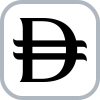 (U+20C3) in HTML/CSS, React, React Native, Vue, Angular and Svelte apps, and formats AED amounts with it.
The UAE Dirham sign is the official currency symbol of the UAE dirham (AED). The Central Bank of the UAE unveiled it on 27 March 2025, and Unicode 18.0, released on 16 September 2026, encodes it as U+20C3. As of October 2026, mainstream system fonts (Apple's San Francisco, Google's Noto and Roboto) don't include it yet, so this package ships a small web font that loads only for U+20C3, plus SVG components, so the sign renders today. Once your users' system fonts include U+20C3, you can drop the web font without changing any code.
Contents: Quick reference · Install · React · CSS & fonts · Formatting · Web Components · Tailwind · Next.js · React Native · Exports · Unicode status · Usage rules · FAQ
| Property | Value |
|---|---|
| Sign | |
| Character (to copy) | (shows as an empty box until your fonts include U+20C3) |
| Code point | U+20C3 UAE DIRHAM SIGN |
| Block, category | Currency Symbols (U+20A0–U+20CF), General Category Sc (Symbol, Currency) |
| Unicode version | 18.0, released 16 September 2026 |
| HTML | ⃃ or ⃃ (numeric character reference; there is no named entity) |
| CSS | content: "\20C3"; |
| JavaScript / JSON | "\u20C3" (JavaScript also accepts "\u{20C3}") |
| URL encoding | %E2%83%83 |
| UTF-8 bytes | E2 83 83 |
| Currency code | AED (ISO 4217, numeric 784, 2 decimal places) |
| Arabic abbreviation | د.إ, short for درهم إماراتي (Emirati dirham); it is not the sign |
| Placement | Before the amount, with a space: formatDirham(1234.5) returns the sign, a no-break space, then 1,234.50 |
npm install dirham
# or
pnpm add dirham
# or
yarn add dirhamRenders an inline SVG, so no font loading is required, and it works with server-side rendering.
import { DirhamSymbol } from "dirham/react";

function Price() {
	return (
		<span>
			<DirhamSymbol size={16} /> 100
		</span>
	);
}
dirham/react also exports components that use React hooks, so with React Server Components (for example the Next.js App Router), import it in a Client Component (a file that starts with "use client").
Weight variants match the symbol stroke to surrounding text weight:
thin extralight light regular medium semibold bold extrabold black
<DirhamSymbol size="1em" weight="bold" />| Prop | Type | Default | Description |
|---|---|---|---|
size |
number | string |
24 |
Width and height in px, or any CSS value |
color |
string |
"currentColor" |
Fill color |
weight |
DirhamWeight |
"regular" |
Stroke weight to match surrounding text |
aria-label |
string |
"UAE Dirham" |
Accessible label for screen readers |
Font-based alternative. Requires dirham/css to be imported.
import "dirham/css";
import { DirhamIcon } from "dirham/react";

function Price() {
	return (
		<span>
			<DirhamIcon size={16} /> 100
		</span>
	);
}| Prop | Type | Default | Description |
|---|---|---|---|
size |
number | string |
"inherit" |
Font size in px, or any CSS value |
color |
string |
"currentColor" |
Text color |
aria-label |
string |
"UAE Dirham" |
Accessible label for screen readers |
as |
"i" | "span" |
"i" |
HTML element to render |
className |
string |
"" |
Additional CSS class names |
import "dirham/css";<i class="dirham-symbol" aria-label="UAE Dirham"></i>To render U+20C3 inside your own text, put a Dirham family first in your font stack. Its unicode-range is U+20C3, so the browser downloads and uses it only for that character, and your typeface still draws everything else:
body {
  font-family: "Dirham-Sans", Inter, sans-serif; /* or "Dirham", "Dirham-Serif", "Dirham-Mono", "Dirham-Arabic" */
}
List it first rather than last: a family listed before it can claim U+20C3 and draw a box. Chrome resolves generic families such as sans-serif to a system font that draws its missing-glyph box, and some fonts, such as JetBrains Mono (checked October 2026), map U+20C3 to a placeholder glyph.
<p>Total: ⃃ 1,234.50</p>When your users' system fonts include U+20C3, remove the import; the markup stays the same.
@use "dirham/scss";Intl.NumberFormat prints AED or د.إ. for AED and never U+20C3, so formatDirham inserts the sign itself, followed by a no-break space. The outputs below are JavaScript strings: \u{20C3} is the sign and \u{A0} is the no-break space.
import { formatDirham, parseDirham } from "dirham";

formatDirham(1234.5); // "\u{20C3}\u{A0}1,234.50"
formatDirham(1234.5, { locale: "ar-AE" }); // "1,234.50\u{A0}\u{20C3}" (Latin digits)
formatDirham(1234.5, { locale: "ar-AE-u-nu-arab" }); // "١٬٢٣٤٫٥٠\u{A0}\u{20C3}" (Arabic-Indic digits)
formatDirham(100, { decimals: 0 }); // "\u{20C3}\u{A0}100"
formatDirham(100, { useCode: true }); // "AED\u{A0}100.00"
formatDirham(1500000, { notation: "compact" }); // "\u{20C3}\u{A0}1.5M"
parseDirham("\u{20C3}\u{A0}1,234.50"); // 1234.5
Arabic locales put the sign after the number in logical order; see Using the symbol correctly for right-to-left display.
Combines formatting + symbol into a single component. Accepts className for custom styling:
import { DirhamPrice } from "dirham/react";

<DirhamPrice amount={1250} />
<DirhamPrice amount={1500000} notation="compact" weight="bold" />
<DirhamPrice amount={100} useCode />
<DirhamPrice amount={750} className="text-emerald-400 text-2xl" />Count-up / count-down transitions using requestAnimationFrame. No external deps.
import { AnimatedDirhamPrice } from "dirham/react";

<AnimatedDirhamPrice amount={1250} />
<AnimatedDirhamPrice amount={5000} duration={800} easing="easeInOut" />
<AnimatedDirhamPrice amount={99.9} useCode notation="compact" />| Prop | Default | Description |
|---|---|---|
amount |
— | Target value to animate to |
duration |
600 |
Animation duration in ms |
easing |
"easeOut" |
linear · easeIn · easeOut · easeInOut |
locale |
"en-AE" |
Intl locale |
decimals |
2 |
Decimal places |
useCode |
false |
Show AED instead of symbol |
notation |
"standard" |
"standard" or "compact" |
weight |
"regular" |
Symbol weight |
Masked currency input with auto-formatting, paste handling, and Arabic numeral support:
import { DirhamInput } from "dirham/react";

<DirhamInput defaultValue={100} onChange={(v) => console.log(v)} />
<DirhamInput value={amount} onChange={setAmount} min={0} max={999999} />
<DirhamInput locale="ar-AE" useCode />| Prop | Default | Description |
|---|---|---|
value |
— | Controlled numeric value |
defaultValue |
— | Uncontrolled initial value |
onChange |
— | (value: number | undefined) => void; undefined when cleared |
locale |
"en-AE" |
Intl locale |
decimals |
2 |
Maximum decimal places |
min / max |
— | Clamps value on blur |
showSymbol |
true |
Show inline SVG symbol |
useCode |
false |
Show AED text instead of symbol |
selectOnFocus |
true |
Select all text on focus |
Fetch live exchange rates and convert AED amounts:
import { useDirhamRate } from "dirham/react";

function PriceInUSD({ amount }: { amount: number }) {
  const { rate, convert, loading, error } = useDirhamRate("USD");

  if (loading) return <span>Loading…</span>;
  if (error) return <span>Error: {error}</span>;

  return <span>${convert(amount)} USD (rate: {rate})</span>;
}Framework-agnostic — works in Vue, Angular, Svelte, or vanilla HTML:
<script
	type="module"
	src="https://cdn.jsdelivr.net/npm/dirham/dist/web-component/index.js"
></script>

<!-- Symbol only -->
<dirham-symbol size="24" weight="bold"></dirham-symbol>

<!-- Formatted price -->
<dirham-price amount="1250"></dirham-price>
<dirham-price amount="5000000" notation="compact"></dirham-price>
<dirham-price amount="100" locale="ar-AE"></dirham-price>
<dirham-price amount="500" use-code></dirham-price>
Or import in a bundler:
import "dirham/web-component";Importing dirham/web-component in server-side code is safe: where HTMLElement and customElements don't exist (as in Node), the import doesn't throw and registers nothing.
| Attribute | Default | Description |
|---|---|---|
amount |
0 |
Numeric value to display |
locale |
"en-AE" |
Intl locale string (e.g. ar-AE) |
decimals |
2 |
Number of decimal places |
notation |
"standard" |
"standard" or "compact" |
use-code |
— | Boolean attr — show AED instead of symbol |
symbol-size |
"1em" |
SVG symbol width/height |
weight |
"regular" |
thin · light · regular · bold … |
currency |
"AED" |
Currency code when use-code is set |
Animated count-up/count-down price display:
<dirham-animated-price amount="1250" duration="600" easing="easeOut"></dirham-animated-price>Attributes: amount, duration, easing, locale, decimals, notation, use-code, symbol-size, weight
Masked currency input with auto-formatting:
<dirham-input value="100" min="0" max="999999" decimals="2"></dirham-input>
<dirham-input locale="ar-AE" placeholder="المبلغ"></dirham-input>
Attributes: value, locale, decimals, min, max, placeholder, disabled, readonly, show-symbol, use-code, symbol-size, weight
Fires dirham-change event with { detail: { value: number | null } }.
<script setup>
import "dirham/web-component";
</script>

<template>
	<dirham-symbol size="24" weight="bold" />
	<dirham-price amount="1250" />
	<dirham-price amount="5000000" notation="compact" />
</template>import { CUSTOM_ELEMENTS_SCHEMA, Component } from "@angular/core";
import "dirham/web-component";
@Component({
schemas: [CUSTOM_ELEMENTS_SCHEMA],
template: `
<dirham-symbol size="24" weight="bold"></dirham-symbol>
<dirham-price amount="1250"></dirham-price>
`,
})
export class AppComponent {}<script>
import "dirham/web-component";
</script>
<dirham-symbol size="24" weight="bold"></dirham-symbol>
<dirham-price amount="1250"></dirham-price><link
rel="stylesheet"
href="https://cdn.jsdelivr.net/npm/dirham/dist/css/dirham.css"
/>
<i class="dirham-symbol" aria-label="UAE Dirham"></i>import { copyDirhamSymbol } from "dirham";
await copyDirhamSymbol(); // copies the character U+20C3
await copyDirhamSymbol("html"); // copies ⃃
await copyDirhamSymbol("css"); // copies \20C3
await copyDirhamSymbol("arabic"); // copies د.إ (the Arabic abbreviation, not the sign)import { copyDirhamAmount } from "dirham";
await copyDirhamAmount(1234.5); // copies "\u{20C3}\u{A0}1,234.50"
await copyDirhamAmount(1234.5, { useCode: true }); // copies "AED\u{A0}1,234.50"
await copyDirhamAmount(500, { locale: "ar-AE" }); // copies "500.00\u{A0}\u{20C3}"UAE VAT (5%) calculation utilities with configurable rate and precision:
import { addVAT, removeVAT, getVAT, UAE_VAT_RATE } from "dirham";

addVAT(100);                        // 105
removeVAT(105);                     // 100
getVAT(100);                        // 5

addVAT(100, { rate: 0.1 });         // 110 (custom 10% rate)
addVAT(99.99, { decimals: 4 }); // 104.9895Convert amounts between AED and other currencies. Rates are fetched from a free exchange rate API and cached for 1 hour:
import { convertFromAED, convertToAED, fetchExchangeRates } from "dirham";

const usd = await convertFromAED(100, "USD");           // e.g. 27.23
const aed = await convertToAED(27.23, "USD");            // e.g. 100
const manual = await convertFromAED(100, "USD", { rate: 0.2723 }); // 27.23, no network request

const rates = await fetchExchangeRates(); // { USD: 0.2723, EUR: 0.2511, ... }Requires react-native-svg as a peer dependency:
import { DirhamSymbol, DirhamPrice } from "dirham/react-native";

<DirhamSymbol size={24} color="#000" weight="bold" />
<DirhamPrice amount={1250} />
<DirhamPrice amount={500} locale="ar-AE" useCode />Add the Dirham symbol plugin to your Tailwind config:
// tailwind.config.js
import dirhamPlugin from "dirham/tailwind";

export default {
  plugins: [dirhamPlugin],
};
Available utility classes:
| Class | Description |
|---|---|
.dirham |
Base class: sets font-family: Dirham, sans-serif |
.dirham-thin … .dirham-black |
Font weight 100 to 900 (thin, extralight, light, regular, medium, semibold, bold, extrabold, black) |
.dirham-xs |
Font size 0.75rem |
.dirham-sm |
Font size 0.875rem |
.dirham-base |
Font size 1rem |
.dirham-lg |
Font size 1.125rem |
.dirham-xl |
Font size 1.25rem |
.dirham-2xl |
Font size 1.5rem |
.dirham-3xl |
Font size 1.875rem |
.dirham-4xl |
Font size 2.25rem |
.dirham-before |
Adds the sign and a no-break space before the content (::before) |
.dirham-after |
Adds a no-break space and the sign after the content (::after) |
.dirham-price |
Component class (nowrap + tabular-nums) |
Pre-configured next/font/local instance with the Dirham WOFF2 font:
import { dirhamFont } from "dirham/next";
// In your layout, define the --font-dirham CSS variable:
<html className={dirhamFont.variable}>
{children}
</html>
// Then use it where the sign appears:
<span style={{ fontFamily: "var(--font-dirham)" }}>⃃</span>For manual configuration, use the raw config:
import { dirhamFontConfig } from "dirham/next";
import localFont from "next/font/local";

const myDirham = localFont(dirhamFontConfig);npx dirham # Print symbol info
npx dirham copy # Copy the character U+20C3 to the clipboard
npx dirham copy html # Copy ⃃ (also: css, js, arabic, code)Generate shareable price card images for Open Graph and Twitter Cards.
import { generatePriceCardSVG } from "dirham/og";

const svg = generatePriceCardSVG({
  amount: 12500,
  title: "Monthly Rent",
  subtitle: "Dubai Marina, Studio",
  accentColor: "#22c55e",
});
// Returns a self-contained <svg> string (1200×630 by default)// app/api/og/route.tsx
import { ImageResponse } from "next/og";
import { DirhamPriceCard } from "dirham/og";
export const runtime = "edge";
export async function GET(request: Request) {
const { searchParams } = new URL(request.url);
const amount = Number(searchParams.get("amount") ?? "0");
const title = searchParams.get("title") ?? undefined;
return new ImageResponse(
<DirhamPriceCard amount={amount} title={title} />,
{ width: 1200, height: 630 },
);
}Then in your page <head>:
<meta property="og:image" content="/api/og?amount=12500&title=Monthly+Rent" />| Prop | Type | Default | Description |
|---|---|---|---|
amount |
number |
— | Price amount (required) |
title |
string |
— | Header text above the price |
subtitle |
string |
— | Footer text below the price |
locale |
string |
"en-AE" |
Intl locale (RTL auto-detected) |
decimals |
number |
2 |
Decimal places |
notation |
"standard" | "compact" |
"standard" |
Number notation |
width |
number |
1200 |
Image width in px |
height |
number |
630 |
Image height in px |
background |
string |
"#0a0a0a" |
Background color |
textColor |
string |
"#ffffff" |
Text color |
accentColor |
string |
"#22c55e" |
Dirham symbol & badge color |
| Import path | Description |
|---|---|
dirham |
Core utilities, constants, clipboard, VAT, conversion |
dirham/react |
DirhamSymbol, DirhamIcon, DirhamPrice, AnimatedDirhamPrice, DirhamInput, useDirhamRate |
dirham/react-native |
DirhamSymbol, DirhamPrice (requires react-native-svg) |
dirham/web-component |
<dirham-symbol>, <dirham-price>, <dirham-animated-price>, <dirham-input> |
dirham/tailwind |
Tailwind CSS plugin with Dirham utility classes |
dirham/next |
Next.js next/font/local wrapper (dirhamFont, dirhamFontConfig) |
dirham/og |
OG image generation (DirhamPriceCard, generatePriceCardSVG) |
dirham/css |
CSS with @font-face |
dirham/scss |
SCSS with @font-face |
dirham/font/woff2 |
WOFF2 font file (default) |
dirham/font/woff |
WOFF font file |
dirham/font/ttf |
TTF font file |
dirham/font/sans/woff2 |
Sans-serif variant WOFF2 |
dirham/font/serif/woff2 |
Serif variant WOFF2 |
dirham/font/mono/woff2 |
Monospace variant WOFF2 |
dirham/font/arabic/woff2 |
Arabic variant WOFF2 |
Last verified: 5 October 2026.
| Topic | Fact |
|---|---|
| Character | U+20C3 UAE DIRHAM SIGN · Currency Symbols block (U+20A0–U+20CF) · General Category Sc (Symbol, Currency) · added in Unicode 18.0 (2026) · UTF-8 E2 83 83 · decimal 8387 (code chart) |
| Unicode status | Accepted by the Unicode Technical Committee on 22 July 2025 (UTC #184, decision 184-C17) and published in Unicode 18.0 on 16 September 2026 |
| Origin | The Central Bank of the UAE (CBUAE) unveiled the Dirham symbol on 27 March 2025: the Latin letter D, from the English name 'Dirham', crossed by two horizontal lines inspired by the UAE flag (press release, guidelines) |
| Why 18.0, not 17.0 | The Central Bank of the UAE submitted the proposal to Unicode itself (L2/25-159, June 2025). It arrived after Unicode 17.0 had entered beta, so the sign was encoded in Unicode 18.0 |
| Apple | Apple's system fonts do not include U+20C3 yet (checked on macOS 26.6), though they already include the Saudi riyal sign (U+20C1) |
| Android, ChromeOS | Google's Noto and Roboto fonts, the fallback fonts on Android, ChromeOS and most Linux desktops, don't include U+20C3 yet; a Noto maintainer said in September 2026 that the glyph will be commissioned |
| Linux | Apart from the GNU Unifont fallback font (18.0.01), common font packages such as Noto and DejaVu don't include U+20C3 yet |
| Windows | Not yet announced |
| Browsers | Browsers don't need an update to show U+20C3; they need a font that has it. Until system fonts do, a web font that covers it (this package's Dirham font, loaded only for U+20C3 via unicode-range) renders it |
| Digital Dirham mark | The coloured Digital Dirham mark is a logo and has no code point |
The Central Bank of the UAE's Dirham Currency Symbol Guidelines set these rules for text and interfaces:
- Put the symbol before the amount, separated by a space, at the same height and weight as the digits.
formatDirhamdoes this by default (the sign, a no-break space, then the amount), and theweightprop of the SVG components matches the stroke to your text. - Use either the symbol or the code AED, never both. With
useCode,formatDirhamand the components show AED instead of the symbol. - Keep it at least 12px on screen, and don't set it as superscript or subscript.
- Use a solid colour, primarily black or white; no gradients, effects or decorative alterations.
- Don't use it as a logo, lock-up or brand identifier.
For Arabic locales, formatDirham places the sign after the number in logical order. Render the result inside a dir="rtl" container so the sign appears to the left of the amount; DirhamPrice and <dirham-price> set dir="rtl" themselves for ar-* locales.
Because the font on your screen doesn't include it yet. U+20C3 has been part of the Unicode Standard since version 18.0 (16 September 2026), but as of October 2026 Apple's system fonts and Google's Noto and Roboto don't draw it. The character itself is correct and will display once your fonts add it.
HTML: ⃃ or ⃃ (a numeric character reference; there is no named entity). CSS: content: "\20C3". JavaScript and JSON: "\u20C3". URL encoding: %E2%83%83. All of these produce U+20C3, but browsers draw it only with a font that has the glyph, so load a web font that covers it, such as the Dirham font in this package.
Before the amount, separated by a space, at the same height and weight as the digits: U+20C3, a no-break space, then 1,234.50. The CBUAE guidelines say digital interfaces must show it to the left of the number, and that you should use either the symbol or the code AED, never both. Don't set it in superscript or subscript.
AED is the ISO 4217 code for the UAE dirham (numeric 784, two decimal places). د.إ is the Arabic abbreviation of درهم إماراتي (Emirati dirham), which Intl.NumberFormat prints for Arabic locales. U+20C3 is the official dirham sign the CBUAE unveiled in March 2025. Next to an amount, use either the sign or AED, never both.
No. U+20C3 is a currency symbol (General Category Sc), not an emoji: Unicode 18.0's emoji data lists nothing in the U+20C0–U+20CF range, so there is no colour emoji version. Copy the character itself, or use the official CBUAE artwork (SVG or PNG) where you need a picture.
More answers (keyboards, Excel and Word, React): https://dirham.js.org/#faq
MIT. See LICENSE.
The symbol artwork comes from the Central Bank of the UAE: dirham.svg in this repository is the official CBUAE SVG, and the font and component outlines are traced from it. dirham is an independent open-source project and is not affiliated with the CBUAE or the Unicode Consortium. Maintained by Pooya Golchian · See also AIDLC, the AI Development Life Cycle.

Sources: CBUAE announcement, 27 March 2025 · CBUAE Dirham Currency Symbol Guidelines v1.0 · Unicode 18.0.0 · Currency Symbols chart, U+20A0–U+20CF · UTC #184 minutes, decision 184-C17
This project uses Turborepo with pnpm workspaces.
dirham/
├── apps/
│   └── docs/              # Demo and documentation site (Vite + React), deployed to https://dirham.js.org/
├── packages/
│   ├── dirham-symbol/     # The published npm package; its README.md is the source of this README
│   └── tsconfig/          # Shared TypeScript configuration
├── scripts/
│   └── sync-readme.mjs    # Copies the package README and LICENSE into place
├── turbo.json
├── pnpm-workspace.yaml
└── biome.json
| Package | Path | Description |
|---|---|---|
dirham |
packages/dirham-symbol |
The npm package |
@dirham/docs |
apps/docs |
Interactive demo site |
@dirham/tsconfig |
packages/tsconfig |
Shared TypeScript configs |
Everything above "Working on this repository" comes from packages/dirham-symbol/README.md, which is the README npm shows. Edit that file and run pnpm readme:sync; CI fails when the two drift apart.
pnpm install
pnpm --filter @dirham/docs dev
# Opens at http://localhost:3000pnpm install # Install dependencies
pnpm build # Build all packages
pnpm test # Run tests
pnpm lint # Lint
pnpm format # Format
pnpm readme:sync # Copy the package README and LICENSE into placeReleases are published from GitHub Actions using npm trusted publishing (OIDC), so no npm token is needed. Each release also gets a provenance attestation.
# 1. Describe your change (pick the bump type when prompted)
pnpm changeset

# 2. Commit the generated .changeset/*.md file and merge to main
The Publish workflow then opens a chore: version packages PR, and merging it publishes the new version to npm. If no changesets are pending, any version in packages/dirham-symbol/package.json that isn't on npm yet is published as latest.
Opening that PR requires Allow GitHub Actions to create and approve pull requests under the repo's Settings → Actions → General.
Publishing needs a trusted publisher on npm for the publish.yml workflow of pooyagolchian/dirham. That is a one-time setup, done in the package settings on npmjs.com or with npm trust github dirham --repo pooyagolchian/dirham --file publish.yml --allow-publish. If the command fails with E409 Conflict, a trusted publisher is already configured for the package; npm trust list dirham shows which one, so you can check that it names publish.yml.
The monorepo root package.json is marked private: true to prevent accidental publishing.
Contributions are welcome. Please read the Contributing Guide and Code of Conduct before opening a pull request.