


If this project is useful to you, you can support my work:


Home Assistant custom integration for PANDA / ETAG BLE electronic shelf labels.
This integration was built from the reverse-engineered PANDA write protocol in this repository. It keeps the working PANDA pixel transfer path and adds a Gicisky-compatible service API for rendering text, shapes, images, icons, QR codes, barcodes, tables, plots, gauges, and progress bars.
- Bluetooth config flow for supported PANDA / ETAG labels
- Diagnostic buttons for known-good fill and framed-image writes
panda_esl.writeservice compatible with thegicisky.writepayload syntaxpanda_esl.write_guardedservice with duplicate, write-lock, and debounce guards- Preview and last-updated image entities
- Preview and last-updated images restore after Home Assistant restarts
- Write progress percentage sensor updated after each acknowledged image chunk
- Battery percentage sensor refreshed during physical display writes
- Bluetooth RSSI diagnostic sensor from the latest Home Assistant Bluetooth advertisement
- Write-lock switch
- Per-device Rotate switch with immediate display refresh for upside-down mounting
- Packet notification capture switch for BLE transfer diagnostics
- Minimal bundled Noto Sans KR fonts, custom font directories, and Material Design Icons support
The PANDA display supports white, black, and red output. The service syntax accepts yellow for compatibility with Gicisky payloads, but yellow is mapped to red when writing to PANDA hardware.
Supported advertised PANDA / ETAG device families:
| Advertised tag ID | Size | Resolution | Framebuffer layout |
|---|---|---|---|
ETAG-525... |
2.13 inch | 256x128 | Column-major |
ETAG-526... |
2.66 inch | 296x152 | Column-major |
ETAG-530... |
3.5 inch | 360x240 | Column-major |
ETAG-534... |
4.2 inch | 400x300 | Row-major |
Confirmed working product: PANDA / ETAG BLE electronic shelf label
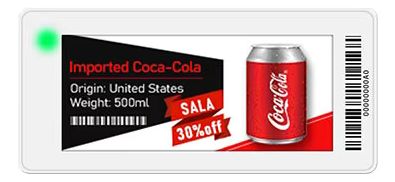
Supported IDs use the PANDA AC ... CA image protocol and advertise either PANDA service UUID 18424398-7cbc-11e9-8f9e-2a86e4005a59 or ETAG service UUID 33323032-4c53-4545-4c42-4b4e494c4f57.
Unsupported or unverified devices:
- Wi-Fi or cloud-managed ESL labels
- BLE labels that do not use the PANDA
AC ... CAimage packet protocol - ETAG device families other than
ETAG-525...,ETAG-526...,ETAG-530..., andETAG-534... - Displays with a resolution other than 256x128, 296x152, 360x240, or 400x300

PANDA ESL is available in the default HACS catalog, so no custom repository setup is required.
- Select the button above, or open HACS and search for PANDA ESL under Integrations.
- Select PANDA ESL and choose Download.
- Restart Home Assistant.
- Add the integration from Settings -> Devices & services -> Add integration -> PANDA ESL.
- Copy
custom_components/panda_esltoconfig/custom_components/panda_esl. - Restart Home Assistant.
- Add the integration from Settings -> Devices & services -> Add integration -> PANDA ESL.

The integration is configured through the Home Assistant UI. If Home Assistant discovers a supported PANDA / ETAG label over Bluetooth, select it from the discovered devices list. You can also start the config flow manually from Settings -> Devices & services -> Add integration -> PANDA ESL.
Open Settings -> Devices & services -> PANDA ESL -> Configure to adjust write behavior:
| Option | Default | Description |
|---|---|---|
| Write retries | 1 |
Full write retries after the first send. 0 disables retries. |
| Write delay | 150 ms |
Delay between PANDA preamble packets. Image chunks advance on device progress notifications. |
| Prevent duplicate send | false |
Skip guarded writes when the rendered image matches the last rendered image. |
| Debounce delay | 0 ms |
Delay guarded writes so newer writes can replace pending writes. 0 disables debounce. |
Use Reconfigure from the integration entry menu to update the display name stored by the integration and refresh Bluetooth advertisement metadata when the label is currently visible.
Each configured label creates one Home Assistant device.
| Entity | Category | Enabled by default | Description |
|---|---|---|---|
| Last updated content | None | Yes | PNG image of the last payload successfully written to the label. |
| Preview content | Diagnostic | Yes | PNG preview of the last rendered payload, including dry runs. |
| Write progress | None | Yes | Percentage progress for the active or most recent BLE image write, with chunk counts as attributes. |
| Write status | None | Yes | Idle, Writing, Transfer complete, or Error, with the last result and error as attributes. |
| Battery | Diagnostic | Yes | Last battery percentage reported by the label during a physical display write. |
| Bluetooth RSSI | Diagnostic | Yes | Latest advertised Bluetooth signal strength in dBm. |
| Write lock | Configuration | Yes | Prevents panda_esl.write_guarded from physically writing to the label. |
| Rotate | Configuration | Yes | Rotates all display content by 180 degrees for upside-down mounting and immediately refreshes the last successfully sent image. |
| Packet notification capture | Diagnostic | No | Writes detailed BLE packet and notification traces to config/panda_esl_traces/. |
| Send white fill | Diagnostic | No | Sends a known-good full white diagnostic image. |
| Send black fill | Diagnostic | No | Sends a known-good full black diagnostic image. |
| Send red fill | Diagnostic | No | Sends a known-good full red diagnostic image. |
| Send framed image | Diagnostic | No | Sends a framed diagnostic image for orientation and border checks. |
Turn on Rotate in the device's Configuration section when mounting a label upside down. Turn it off for normal orientation. The setting is independent for each label and survives Home Assistant restarts.
Changing Rotate immediately resends the last successfully sent image in the new orientation. Allow the normal Bluetooth transfer and e-paper refresh time. If a write is already in progress, rotation waits for it to finish. With no saved image, the setting applies to the first write instead.
Rotate applies an additional 180 degrees after the action's rotate value, including for images, text, and diagnostic buttons. Existing layouts and automations do not need changes. Preview content and Last updated content retain the rendered image orientation, independent of the Rotate switch. The action's explicit rotate value still applies to the rendered layout. Queued writes use the current setting when they are sent.
Saved Last updated content from older versions is normalized on upgrade. Older saved previews are regenerated by the next write or dry run because their original orientation was not recorded.
Turn off Write lock before changing Rotate when there is a saved image. If the refresh fails, Home Assistant reports the error and keeps the previous Rotate setting and Last updated content. Try toggling again after restoring Bluetooth connectivity.
The actions intentionally mirror the Gicisky payload syntax, but use PANDA's BLE packet format when writing the rendered pixels.
Important
Always quote the exact y key for text elements, for example "y": 10. Home Assistant's UI YAML editor uses YAML 1.1, where an unquoted y is parsed as the Boolean value true. If y is not quoted, PANDA ESL does not receive a vertical coordinate and uses automatic vertical placement instead. Longer keys such as y_start and y_end are not affected.
action: panda_esl.write
target:
  device_id: YOUR_DEVICE_ID
data:
  background: white
  payload:
    - type: text
      value: Hello PANDA
      x: 10
      "y": 10
      size: 32
      color: black
    - type: rectangle
      x_start: 8
      y_start: 52
      x_end: 120
      y_end: 110
      outline: black
      fill: red
      width: 2
Use dry_run: true to update the preview image entity without writing to the physical label.
action: panda_esl.write_guarded
target:
  device_id: YOUR_DEVICE_ID
data:
  debounce_override_ms: 0
  payload:
    - type: text
      value: Immediate guarded write
      x: 10
      "y": 10
size: 24| Parameter | Required | Description |
|---|---|---|
payload |
Yes | List of drawing elements. See Supported Payload Elements below. |
rotate |
No | Rotation in degrees: 0, 90, 180, or 270. |
background |
No | white, black, red, or yellow. Yellow maps to red on PANDA hardware. |
threshold |
No | Black threshold from 0 to 255. Default is 128. |
red_threshold |
No | Red/yellow threshold from 0 to 255. Default is 128. |
dry_run |
No | Render and update the preview without sending BLE packets. |
debounce_override_ms |
No | write_guarded only. Overrides the configured debounce delay for this call. |
panda_esl.write sends immediately. panda_esl.write_guarded applies duplicate prevention, write lock, and debounce settings before sending.
The renderer supports the same element names and field names used by hass-gicisky:
text, multiline, line, rectangle, rectangle_pattern, circle, ellipse, icon, dlimg, qrcode, barcode, datamatrix, diagram, plot, progress_bar, arc, gauge, polygon, table, and text_box.
PANDA ESL ships a small runtime font set so HACS installs stay lightweight:
fonts/NotoSansKR-Regular.ttffonts/NotoSansKR-Bold.ttf- Material Design Icons webfont files for
iconpayloads
To add more fonts, copy .ttf or .otf files into config/panda_esl/fonts/ in your Home Assistant config directory. Fonts stored there are not managed by HACS and will survive integration upgrades.
The renderer resolves font paths in this order:
- Absolute path.
- Bundled integration font under
custom_components/panda_esl/fonts/. config/panda_esl/fonts/.config/www/fonts/.- Bundled
NotoSansKR-Regular.ttffallback.
For compatibility, a payload value such as fonts/GmarketSansTTFBold.ttf will also look for GmarketSansTTFBold.ttf in the custom font directories. This lets existing payloads keep working after copying the optional font file into config/panda_esl/fonts/.
Optional font files that used to be bundled with the integration are still available in optional_fonts. Download the files you need from that folder and place them in config/panda_esl/fonts/, then reference them from YAML:
font: GmarketSansTTFBold.ttfSee Font Previews for dry-run examples of each bundled and optional text font on the 2.13" (256x128) and 2.66" (296x152) PANDA ESL canvases, including fonts chosen for crisp rendering on small monochrome screens.
PANDA ESL is a local push Bluetooth integration. Home Assistant updates runtime state when Bluetooth advertisements are received and marks write buttons unavailable when the label leaves the Bluetooth cache. Image entities update only after a render or successful write, and Home Assistant restores their last retained images after restarts. Diagnostic fill and framed-image buttons update Preview content when pressed and Last updated content after the BLE transfer succeeds. The integration does not poll a cloud service.
The Bluetooth RSSI sensor updates from the latest advertisement Home Assistant receives for the label. It is a last-advertised signal value in dBm, not a continuously measured connection-quality percentage.
Each physical display write sends the PANDA device-information request after notifications start. A valid modern, legacy, or display-status reply updates the Battery sensor in percent. The query is best-effort: labels that do not reply still continue the display transfer, and dry runs or skipped guarded writes do not query the label. The sensor remains unavailable until the first battery reply and is refreshed only by later physical display writes; there is no polling or manual battery-refresh action.
Writes use a connectable BLE handle at action time. If no connectable handle is available, Home Assistant raises a translated action error and records the failure in the diagnostic attributes.
The Write progress sensor resets to 0% when a physical write attempt starts, advances after each acknowledged image chunk, and reaches 100% only after the final commit notification is received.
100% and Transfer complete confirm that the tag acknowledged the image transfer and refresh command. The protocol does not provide a readback of the physical screen. Preview content is the locally rendered image, and Last updated content is the last acknowledged image; neither is a photograph or readback of the label. A blank screen after an acknowledged transfer cannot be detected from these acknowledgements alone.
Write status reports Error when a transfer fails. Its last_error attribute and the same attribute on Write progress contain the failure reason. A new attempt shows Writing and a successful transfer clears the error. Disconnect errors during cleanup do not suppress the configured retries or invalidate an acknowledged transfer.
Example scripts for the 256x128 PANDA display live in examples.
| Size | Example | Preview | YAML |
|---|---|---|---|
| 2.13" (256x128) | Calendar | 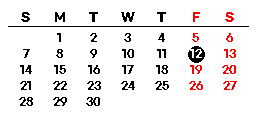 |
2.13" Calendar |
| 2.13" (256x128) | Wi-Fi QR | 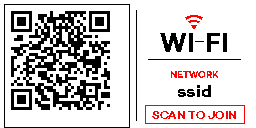 |
2.13" Wi-Fi QR |
| 2.13" (256x128) | Vacation countdown | 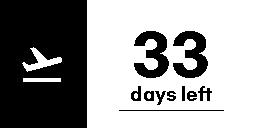 |
2.13" Vacation countdown |
| 2.13" (256x128) | Dragon Boat Festival |  |
2.13" Dragon Boat Festival |
| 2.13" (256x128) | Weather today | 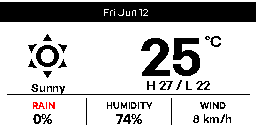 |
2.13" Weather today |
| 2.13" (256x128) | Weather forecast | 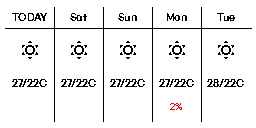 |
2.13" Weather forecast |
Made something cool with PANDA ESL? Post a photo or screenshot in the PANDA ESL thread on the Home Assistant Community forum. Feel free to include the YAML too.
- Show a small daily calendar, weather forecast, or reminder on a shelf label.
- Render QR codes, barcodes, and short status messages from Home Assistant automations.
- Use
write_guardedwith debounce to prevent rapid repeated writes when multiple entities change together. - Use
dry_runto preview a rendered payload before writing it to a physical label.
- The known-good PANDA write path sends two image planes through the
0000ffe1-0000-1000-8000-00805f9b34fbcharacteristic using the reverse-engineeredAC ... CApacket framing. - PANDA image chunks are ACK-gated using device progress notifications. A timed-out chunk aborts the current connection and uses the configured full write retry.
- The default write delay is 150 ms for preamble packets; image chunks advance after ACK progress.
- The canvas is selected from the advertised tag ID: 256x128 for ETAG-525, 296x152 for ETAG-526, 360x240 for ETAG-530, and 400x300 for ETAG-534.
- ETAG-530 labels use the opposite black-plane polarity from the other supported families; the integration corrects this automatically.
- ETAG-534 labels use a row-major framebuffer while the other supported families use column-major framebuffers; the integration selects the correct layout automatically.
- Battery percentage is queried only as part of a physical display write and remains at the last reported value between writes.
- Yellow payload colors are rendered as red on PANDA hardware.
- A label must be visible to Home Assistant Bluetooth before a physical write can start.
plotelements require Home Assistant Recorder history for the referenced entities.
Use Download diagnostics from the PANDA ESL device entry to collect redacted config, runtime state, and write summaries. Turn on the Packet notification capture diagnostic switch to write JSONL transfer traces under config/panda_esl_traces/. Entity attributes keep only the summary and latest trace file path.
Common issues:
| Symptom | What to check |
|---|---|
| No labels are discovered | Confirm a Bluetooth adapter is enabled, move the label closer, and wait for the label to advertise as ETAG-*. |
| Write action fails with no connectable Bluetooth handle | Wait for a fresh advertisement, move closer to the adapter, or restart the label if possible. |
| Rendered image is visible in Preview but not on the label | Disable Write lock, check that Packet notification capture does not show ACK timeouts, and try a diagnostic fill button. |
| Plot element fails | Confirm Recorder is enabled and the referenced entity has numeric history in the requested time range. |
- Remove the PANDA ESL integration entry from Settings -> Devices & services.
- Restart Home Assistant if you plan to delete the custom component files.
- Remove
custom_components/panda_eslfrom your Home Assistant config directory, or uninstall the integration from HACS. - Optional: delete old packet trace files from
config/panda_esl_traces/.
The HACS repository layout is:
custom_components/panda_esl/
  brand/icon.png
optional_fonts/
hacs.json
README.md
All files needed at runtime live under custom_components/panda_esl/, as required by HACS integration repositories. Optional fonts live outside the integration and are published for manual download only. Releases include a panda_esl.zip asset so HACS can install the runtime integration without downloading optional font assets. HACS is configured to offer tagged releases rather than the default branch because release assets are required for this lightweight package path.
I am not affiliated with PANDA, ETAG, AliExpress, or any seller or manufacturer of the referenced devices. Use this custom component at your own risk. I am not responsible for any damage to your device, data loss, hardware malfunction, or other issues caused by using this component.