
A MOS 6502 CPU emulator built with C++
Explore the docs »
View Demo
•
Report Bug
Table of Contents
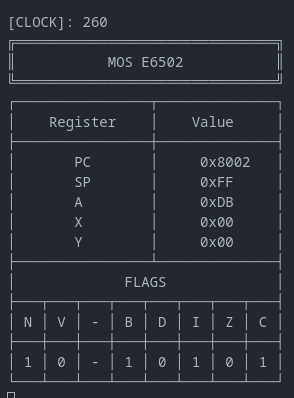
The E6502 emulator is a MOS 6502 CPU emulator that runs its instructions sets, emulates it's addressing modes, flags and every other functional aspect of the processor.
The 6502 is a very famous and versatile processor, used in many known applications in the 70-80's, as NES and Atari.
The processor works with a 16 bit memory bus width, supporting max 64 KiB memory size, though it's full capacity is rarely used. The E6502 Emulator also implements a ROM emulation with configurable memory size.
E6502 implements all 56 official instructions with all addressing modes, and soon will be able to handle illegal (non-official) instructions/opcodes.
This project was built with:

This project has shell scripts to help building the project. It is recommended to use a Debian-based distro to run this project, although it is possible to build and use in any other platform that supports at leas C++ 17.
This manual covers only Debian-based GNU/Linux distros.
Install these dependencies in your machine.
- Git
sudo apt-get install git
- CMake
sudo apt-get install cmake
- G++
sudo apt-get install g++
- Run
./debug.shor the./release.shscript, if you want either the Debug or the Release mode build. - Wait for the project to build. It may take a while.
- When the code is built, the shell script will automatically run the executable.
In the rom folder, there is a sample of 6502 Assembly code and its compiled binary. To create your own ROM, it is recommended to use the vasm assembler with old style mode configured.
Contributions are what make the open source community such an amazing place to learn, inspire, and create. Any contributions you make are greatly appreciated.
If you have a suggestion that would make this better, please fork the repo and create a pull request. You can also simply open an issue with the tag "enhancement". Don't forget to give the project a star! Thanks again!
- Fork the Project
- Create your Feature Branch (
git checkout -b feature/AmazingFeature) - Commit your Changes (
git commit -m 'Add some AmazingFeature') - Push to the Branch (
git push origin feature/AmazingFeature) - Open a Pull Request
Distributed under the MIT License. See LICENSE for more information.
Renan Andrade - Instagram - renandasilvaoliveiraandrade@gmail.com